

How AI Models Interpret Prompts
To understand your AI visibility, it is important to understand how AI models process prompts. Unlike traditional search engines, AI assistants do not focus on individual keywords. They analyze the entire request to understand what the user wants to achieve and which information is relevant to the situation. When someone asks an AI tool a question, the model generally tries to identify three things:1. The goal
The model first interprets what the user is trying to accomplish. For example: Which project management software is best for remote teams? The goal is to receive recommendations. Compare that to: How can remote teams stay organized? The topic is similar, but the goal is different. The user is looking for advice rather than products. Because the goal differs, the AI may generate entirely different answers.2. The context
Next, the model analyzes the details surrounding the request. Consider these prompts:- What is the best CRM?
- What is the best CRM for a startup with a small sales team?
- Company size
- Industry
- User role
- Budget constraints
- Team structure
- Specific use cases
3. The audience
AI models also infer who is asking the question. A marketing leader, a software developer, and a procurement manager may ask about the same topic in different ways and receive different recommendations. For example: Which analytics platform is best for marketing teams? and Which analytics platform provides the most flexible API integrations? Both prompts concern analytics software, but represent different audiences with different priorities. This is why prompt design and personas work best together. A strong prompt becomes even more valuable when viewed through a specific audience perspective.Why small wording changes rarely matter
Many users create multiple prompts that ask the same question in slightly different ways. For example:- What is the best project management software for remote teams?
- Which project management platform should a remote team use?
- What project management tool works best for distributed teams?
What makes a good visibility prompt?
A useful prompt represents a real decision, challenge, or question that someone in your target audience might have. Good prompts usually:- Reflect a genuine user need
- Include enough context to produce meaningful recommendations
- Represent a specific audience or use case
- Help you understand how AI responds in an important business situation
- Which payroll solutions work well for companies with employees across Europe?
- What cybersecurity tools should medium-sized businesses evaluate in 2026?
- Which observability platform is easiest for engineering teams to implement?
Common mistakes
Using keywords instead of questions
AI assistants interact through conversations, not keywords. Less useful: CRM software More useful: Which CRM software is best for a growing B2B sales team?Being too broad
Broad prompts often generate broad answers. Less useful: What is the best marketing software? More useful: Which marketing automation platform is best for SaaS companies with small teams?Creating duplicate prompts
Different wording does not always create different insights. Instead of adding similar variations, create prompts that represent different audiences, needs, or decision contexts.Forcing your brand into every prompt
A prompt should help you understand visibility, not artificially create it. Questions that include your brand can be useful for understanding brand perception. However, questions that do not mention your brand are often more valuable for understanding whether AI recommends your brand naturally.Organize your prompts with Topics
Topics help you organize related prompts into meaningful categories. Each prompt can be attached to multiple topics, making it easier to manage your prompt library and understand performance across different areas of your business. Rather than reviewing prompts one by one, Topics allow you to analyze visibility, sentiment, share of voice, and position across entire topics. Examples of common topics include:- Competitor Comparisons
Questions that compare brands, products, or services within your market. - Pricing & Budget Considerations
Questions about costs, pricing models, ROI, and budget-friendly alternatives. - Industry Use Cases
Questions focused on how solutions are used within specific industries or business contexts. - Product Features
Questions about capabilities, functionality, integrations, and technical requirements. - Customer Challenges
Questions centered around common problems, pain points, and business needs.
Creating your first Topics
When getting started, create a small set of Topics that represent the most important areas where you want to measure AI visibility. Starting with a small number of well-defined Topics helps keep your setup organized from the beginning and makes it easier to identify strengths, weaknesses, and opportunities within specific areas of your market.Creating your first Personas
When getting started, create a small set of Personas that represent your most important customer groups.- Identify your target audiences
Consider who researches, evaluates, purchases, or uses your solution. - Define their goals and priorities
Think about what each audience is trying to achieve and what influences their decisions. - Create Personas based on meaningful differences
Focus on audiences that are likely to ask different questions or have different requirements. - Assign relevant prompts to each Persona
This helps you analyze how AI responses vary across audiences and customer journeys.
Option 1: Add Personas manually
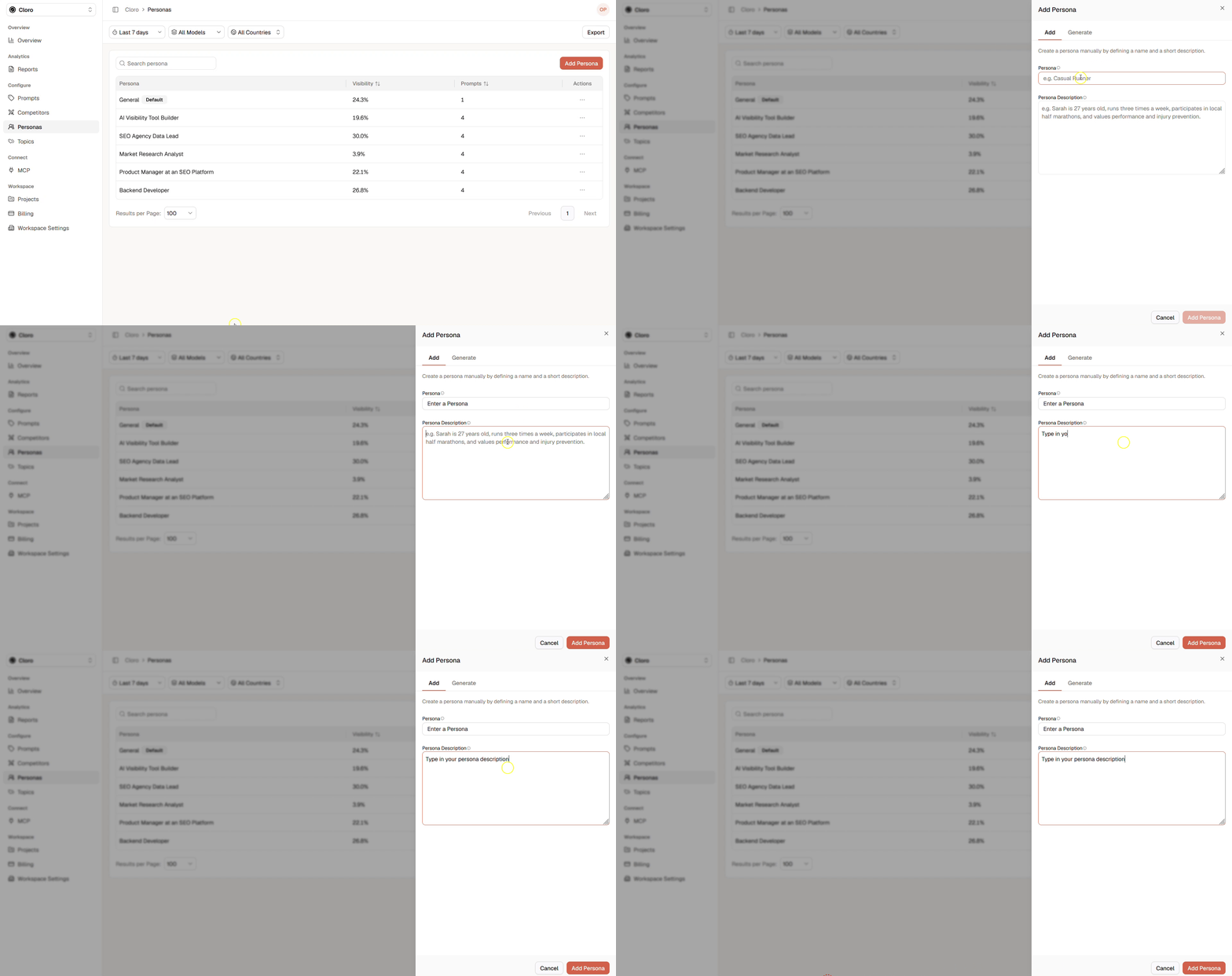
- Click Add Persona in the personas page.
- Enter a persona name or a short describing naming to distinguish personas from each other.
- Enter a clear and detailed description of the persona.
- Click Add Persona to add to your persona library.
Option 2: Generate Personas by AI
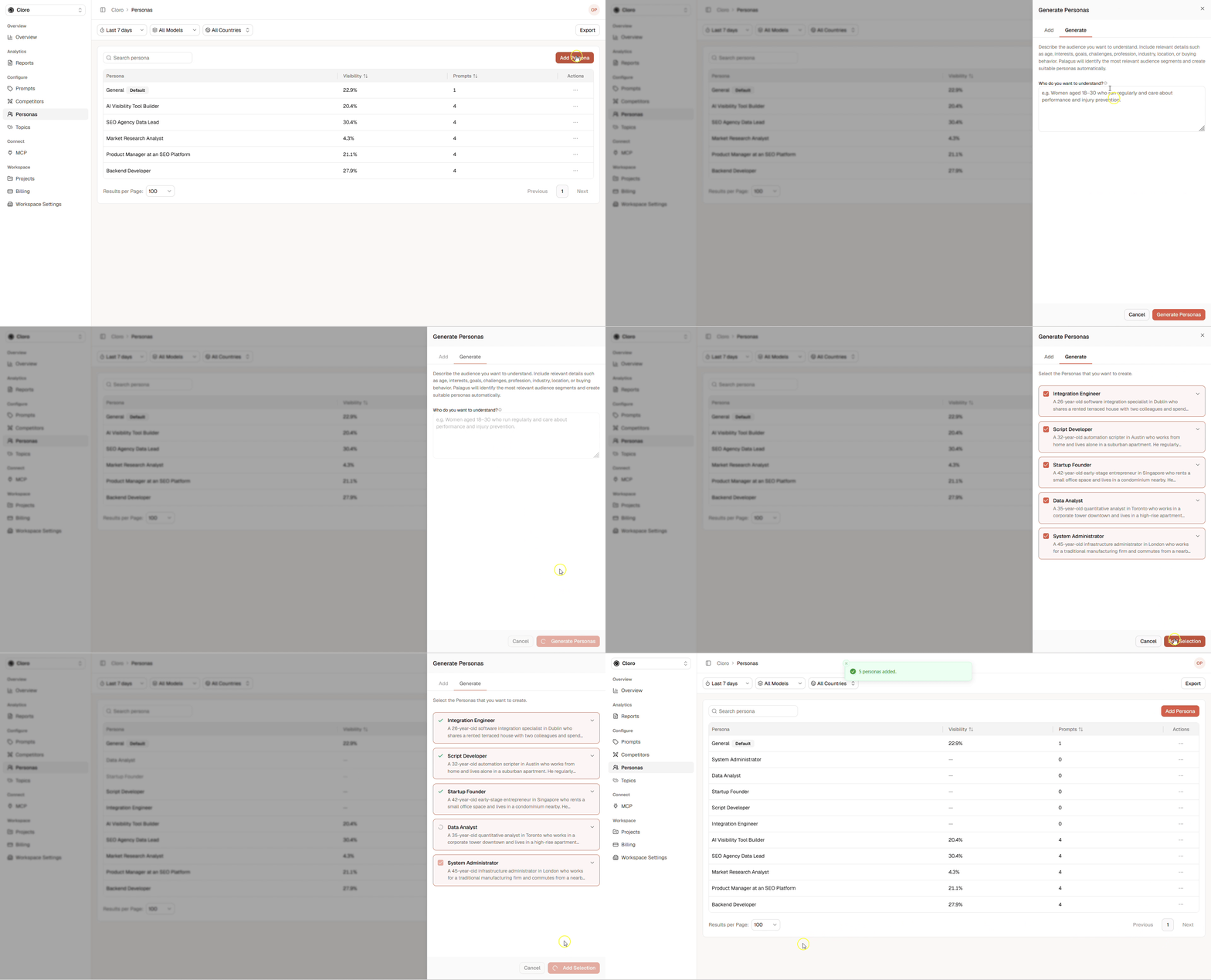
- Click Add Persona in the personas page.
- Click the Generate tab.
- Enter a clear and detailed context of the personas that you want to create or leave it out and let the AI create persona suggestions that are bound to your products and to your company.
- Select a language.
- Review the generated personas and select the ones that you want to include into your persona library.
- Click Add Selection to add to persona library.
Building Your Prompt Library
Your prompt library defines the conversations you want to monitor across AI platforms. A well-structured library helps you understand how AI discusses your brand, competitors, products, and industry from different perspectives. Whether you start with a handful of prompts or hundreds, the goal is the same: track the questions that matter most to your business.Add Prompts
We let you choose between the following options to add prompts:- Add prompts manually
- Bulk upload
- Prompt suggestions
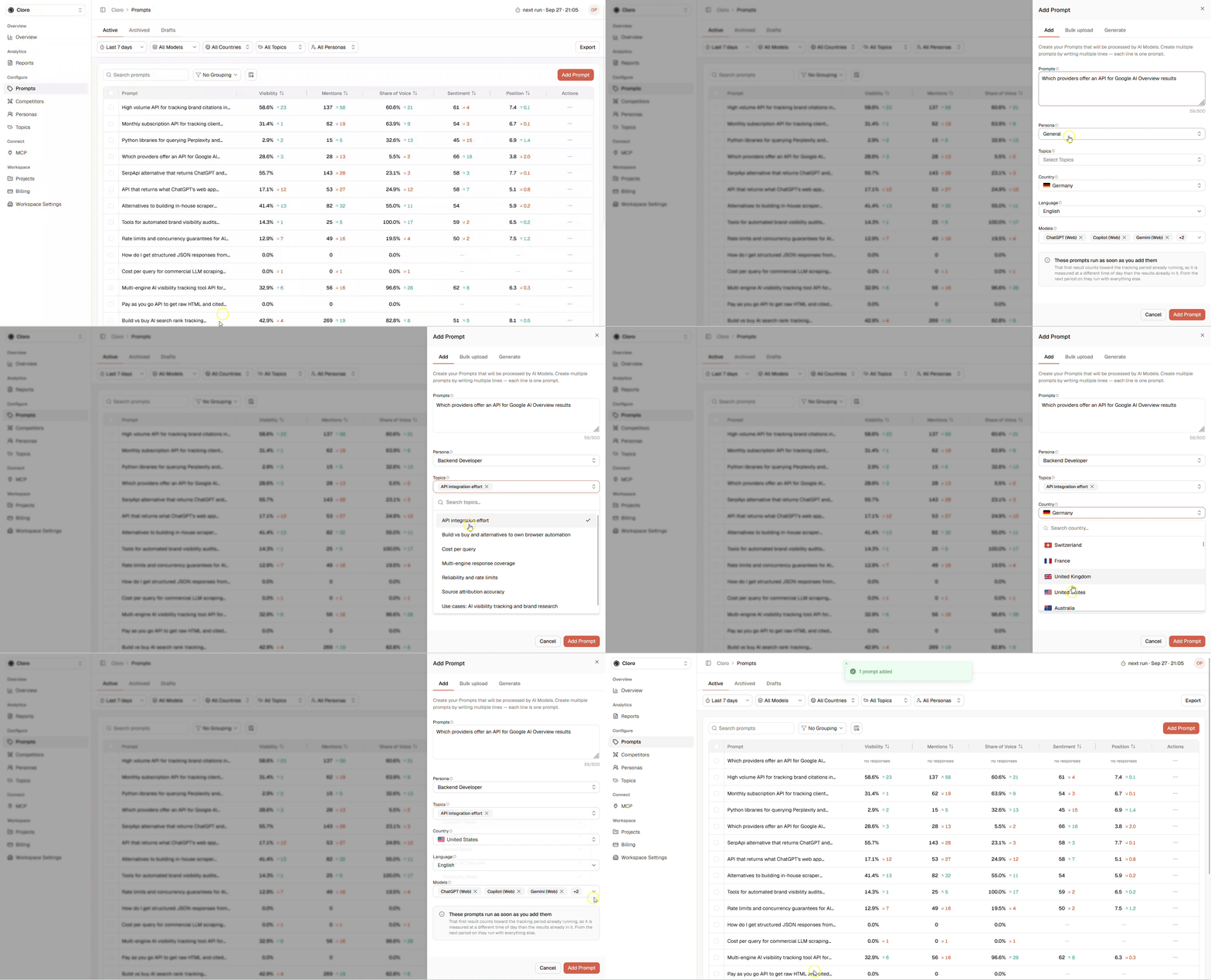
- Click Add prompt in the prompts page.
- Enter line by line one prompt. Use line break for each separated prompt.
- Set Persona. You can only choose one persona.
- Set Topics (Optional).
- Set Country to simulate from where the prompts are running. Responses may differ when choosing different countries for the same prompt.
- Set the Language in which the prompts are written.
- Set the Models that should run the prompts.
- Click Add to create the prompt/s.
Option 2: Bulk upload- Row 1: Header row (ignored during import).
- Column 1: Prompt text (one per row, max 200 characters per prompt).
- Column 2: Location, using ISO 3166-1 alpha-2 codes (US, DE, and so on). If blank or invalid, your project’s default location is used.
- Column 3: A topic (for example, CRM Software).
- Column 4 and beyond: Tags to assign to each prompt. Add text to assign as many tags as you need, using one column per tag.
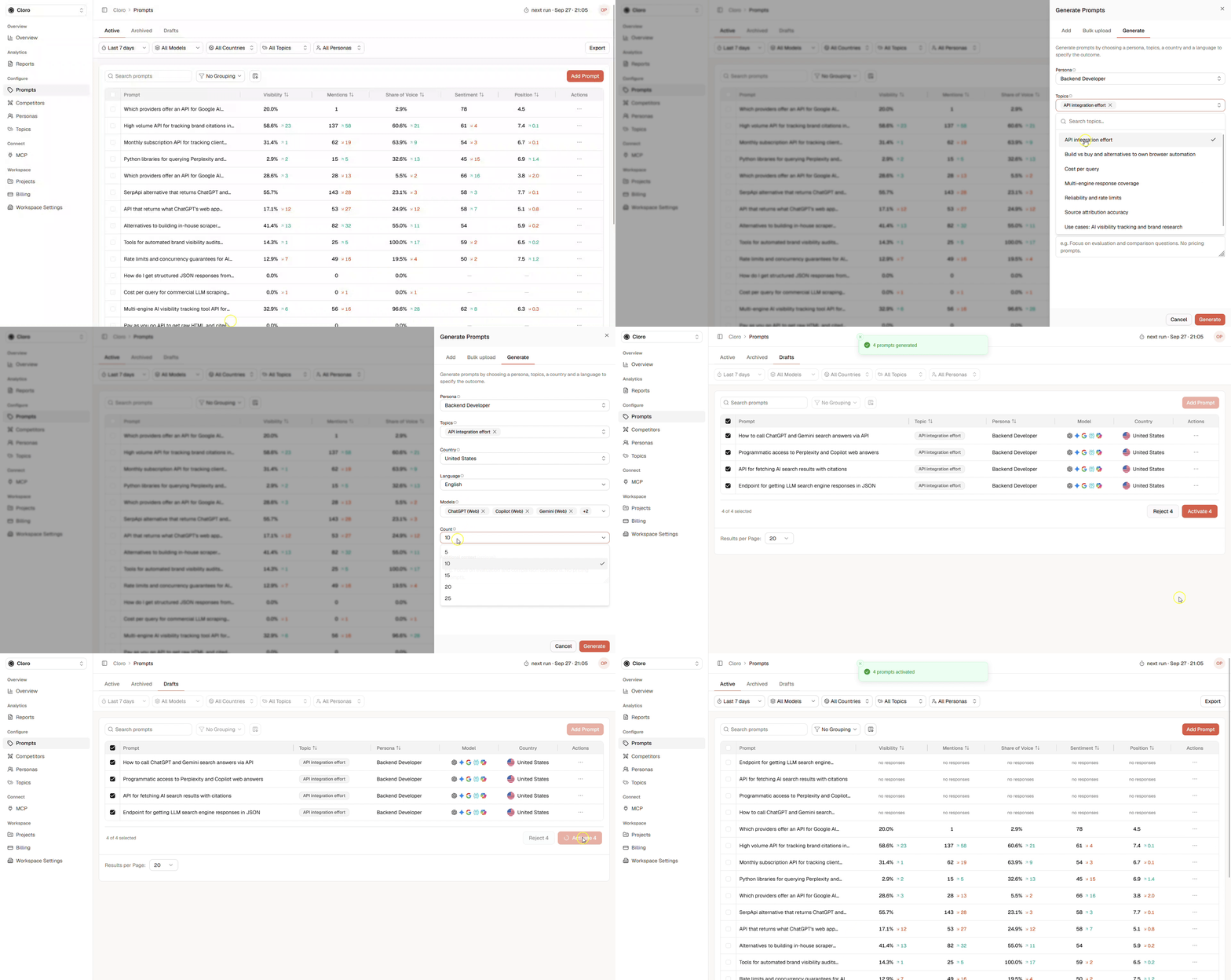
- Click Add prompt in the prompts page.
- Click on the Generate tab.
- Set Persona. You can only choose one persona.
- Set Topics (Optional).
- Set Country to simulate from where the prompts are running. Responses may differ when choosing different countries for the same prompt.
- Set the Language in which the prompts will be generated.
- Set the Models that should run the prompts.
- Set the Count of the generated prompts.
- Include Additional context to fine-tune the result (Optional).
- Click Add to add the prompt/s to the drafts section.
- Inspect the prompts and Edit them if required and click Activate.
Prompt System
There are three types of prompts:- Active prompts: Those are the ones that are send out to AI chat bots and are limited by your current plan.
- Archived prompts: Don’t count toward limits but preserve historical data. They are not active and used to store historical data about prompts that have been used in the past. You can reactivate them within the archive tab.
- Suggested prompts: They can be activated by you. There is no active limitation to them.
Expand Over Time
Your first prompt set does not need to be perfect. Start with the most important use cases, products, audiences, and competitors. As you collect results, you’ll discover areas where additional prompts can provide deeper insights. Review your prompt library regularly and ask:- Which customer questions are already covered?
- Which audiences are missing?
- Which competitors appear frequently?
- Which topics require deeper analysis?
- Are some prompts producing nearly identical results?