

What is a Competitor?
A competitor is any brand you want to compare with your own brand. This can include:- Direct competitors offering a similar product
- Alternative solutions addressing the same problem
- Established brands in your market
- Emerging companies gaining visibility
- Products frequently mentioned alongside your brand
Why Add Competitors?
Your own metrics become more meaningful when viewed in context. For example, a high visibility score shows that your brand appears frequently. However, it does not tell you whether a competitor appears even more often. Adding competitors allows you to place your performance within the wider market. Competitor tracking helps you:- Compare brand visibility across AI-generated answers
- Understand how attention is distributed between brands
- Identify competitors receiving stronger recommendations
- Discover differences between personas and prompts
- Monitor changes in the competitive landscape
- Find topics where your competitors outperform your brand
- Recognize new brands appearing in relevant conversations
How to Add a Competitor
Competitors are managed within your Palagus project. Each project has its unique separated set of competitors. Those are bound only to the project and can differ from project to project. There are two possible ways to include competitors that you want to track.1. Add competitors manually
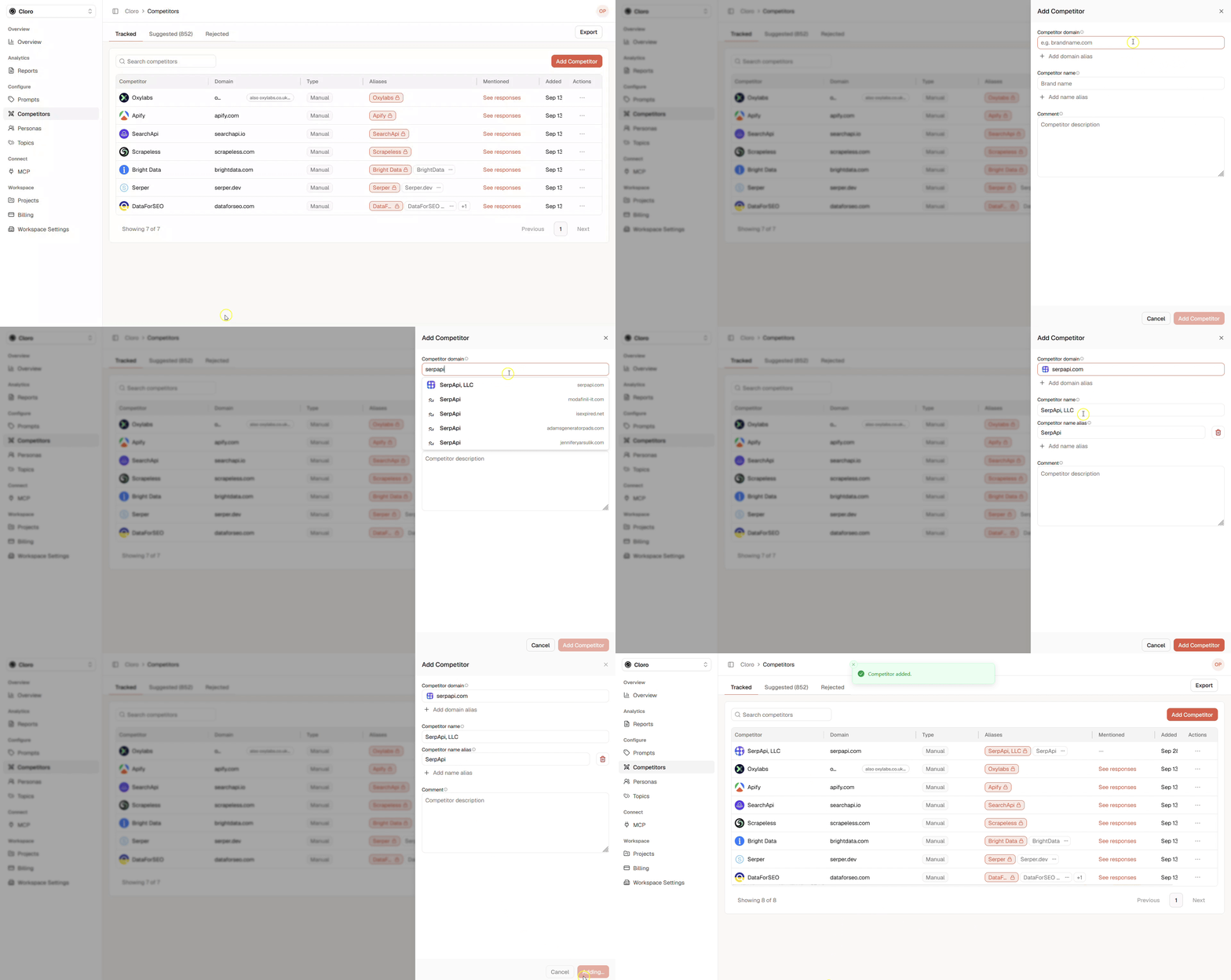
- Click Add Competitor
- Enter the Competitor domain, its main website. It is required and is how the competitor is matched in citations.
- Enter the Competitor name, its official brand name.
- Add other domains with Add domain alias and other names or spellings with Add name alias (optional).
- The Comment field is a note for you while you fill in the form. It is not saved with the competitor.
- Click Add Competitor to save it.
2. Select suggested competitors
Open the Suggested tab on the competitors page. We inspect in each cycle all coming responses for occurring competitors that haven’t been listed in the project and register them in the Suggested tab. We want to ensure that you see all competitors that you aren’t aware of. We count each occurrence of each competitor and list all tracked aliases. Spellings of one company that differ only in punctuation or spacing, such as De’Longhi and DeLonghi, appear as one row, unless they point to different websites. Accepting the row tracks the company once. You can add information by adding aliases within the table. Once you accept a competitor, you can add more information by editing it on the Tracked tab. All listed competitors in the Suggested tab aren’t actively tracked in each run. You can activate the tracking for a suggested competitor by accepting it: click Accept (the check mark) in its row. Accepting will transfer the competitor to the Tracked tab and you will track the competitor in each cycle.3. Add suggestions automatically
Palagus can track a suggested competitor for you once the answers name it often enough. The sentence above the Suggested table sets how often: Automatically add competitors named in … % of responses. Change the share with − and +, or type it; it is 50 % unless you change it, and any whole number from 1 to 100. A suggestion is added automatically when all of these hold:- the project has collected at least 500 responses; before that, the line under the setting says how many have been collected so far,
- the share of the project’s responses that name it reaches your setting,
- it has a domain, or Palagus can find one,
- Palagus has not judged the name to be no competitor of yours,
- and it is not on the Rejected tab. A rejected suggestion is never added automatically.
Edit or delete a competitor
On the Tracked tab, open the competitor’s actions menu (⋯) and choose Edit. In Edit Competitor you change its domain, its name and its aliases: Add domain alias and Add name alias add one, the bin next to an alias removes it. Click Save Changes; nothing changes before that. An alias marked Ambiguous is also a common word, like “zeit” for DIE ZEIT. AI reads each match of it and counts it only if the competitor is meant. AI marks such aliases on its own. To change it, open the alias’s menu (⋯) and choose Mark as ambiguous or Mark as not ambiguous. The competitor’s own name has this menu too, with that one choice. The change applies to answers from then on. To stop tracking a competitor, choose Delete in its actions menu. Deleting cannot be undone and takes a moment. Owners, admins and members edit, delete and accept competitors. A viewer sees them.Sources that belong to a brand
AI answers sometimes cite a domain, or use a name, that belongs to your brand or to a competitor but is not listed among its domains or names. Its cited pages then count as a third party, or its mentions are missed. Palagus points this out in a note above the table on the Competitors page, and on the Details step of a project’s settings.- Confirm adds the domain or the name to the brand. A confirmed domain counts for the brand in past answers too. A confirmed name counts from the next run on, because past answers were already analyzed.
- Not a match dismisses the suggestion.
Choosing the Right Competitors
You do not need to add every company in your industry. Start with the competitors that are most relevant to the decisions you want to make. A useful competitor set can include several categories: Direct Competitors These companies offer a similar product to a similar target audience. They are usually the most important brands for direct comparisons. Market Leaders Well-known brands may appear frequently because AI models associate them strongly with your category. Tracking them helps you understand the visibility gap between your brand and established market leaders. Emerging Competitors New products may initially appear in only a small number of answers. Monitoring them can help you recognize changes in the competitive landscape early.Best Practices for Adding Competitors
Use Consistent Naming
Create one competitor for each brand or product you want to analyze. Avoid adding the same competitor multiple times with slightly different names. For example, do not create separate entries for:CompetitorCompetitor.comCompetitor GmbH
Separate Brands When Necessary
If a company provides several independent products that compete in different categories, it may be more useful to track the relevant product rather than the parent company. Choose the entity that users and AI assistants are most likely to mention in your specific market.Review Your Competitor List Regularly
Your competitive landscape can change over time. Review your competitors when:- New brands repeatedly appear in answers
- Your product enters a new market
- You introduce new personas or prompt clusters
- A competitor changes its name
- Two companies merge
- A product is discontinued
- A previously relevant competitor no longer appears