

Why Chats Matter
Aggregated metrics show the overall development of your brand. Chats explain what is causing those results. By reviewing individual responses, you can:- See exactly how an AI model answers your prompt
- Understand whether and where your brand appears
- Review the context of each brand mention
- Compare responses across different AI models
- Inspect the sources used in the response
- Find content and positioning opportunities
- Detect patterns that may not be visible in aggregated results
Chats and Responses
In Palagus, a chat represents one execution of a prompt on one AI model. The generated answer is shown as a response. A single prompt can therefore have multiple responses because Palagus can run the prompt:- Across multiple AI models
- At different points in time
Where to Find Chats
Chats are available from the Responses tab of an individual prompt or from all aggregated prompts within the Overview page. To open the responses for a prompt:- Navigate either to Prompts or to Overview.
- If you are on the Prompts page, select the prompt that you want to inspect.
- Open the Responses tab.
- Select a response from the table to view its complete details.
The Responses Table
The Responses tab provides an overview of all available answers for the selected prompt.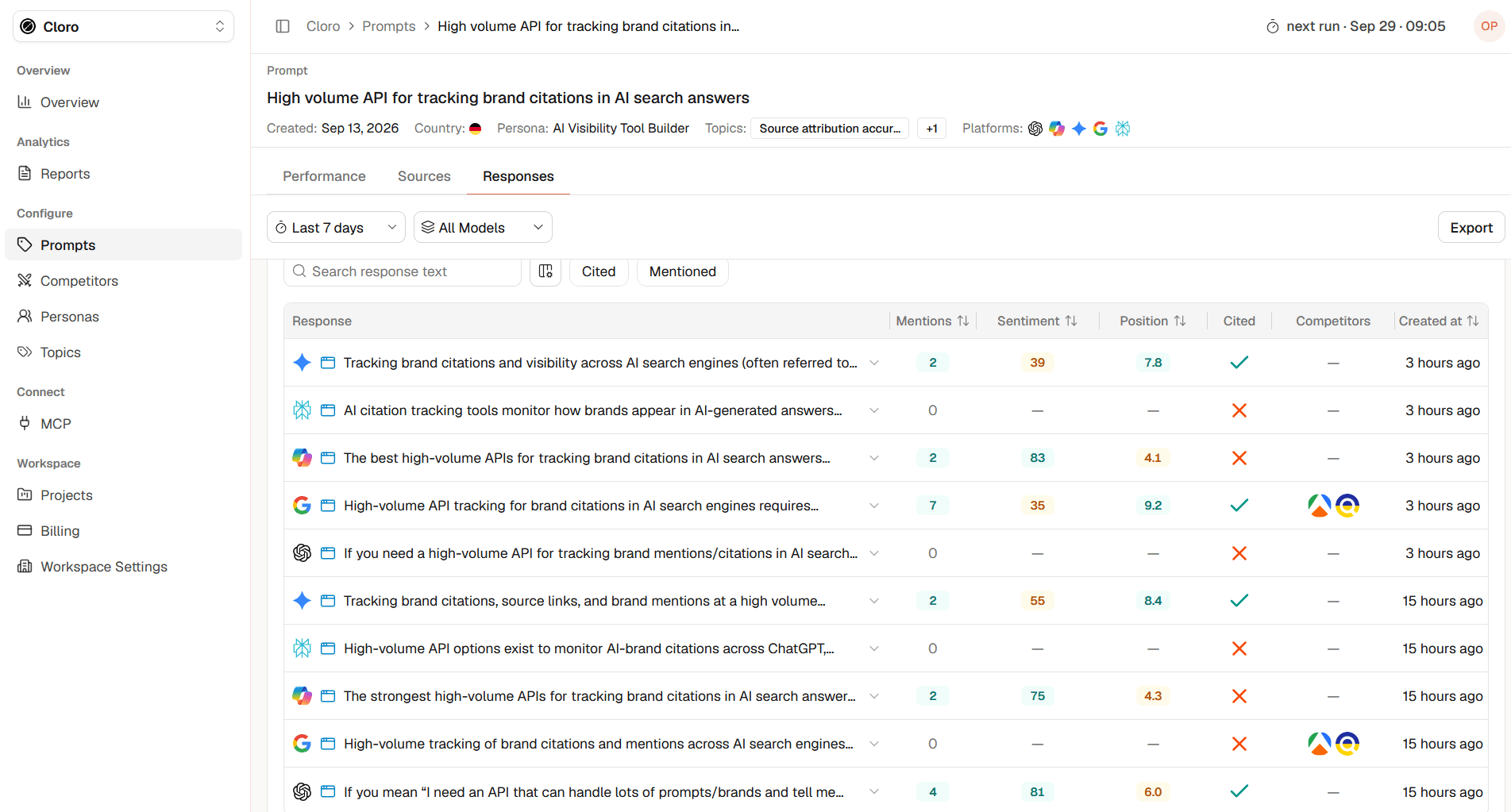
- A checkmark indicates that the website was cited.
- A cross indicates that no citation was detected.
Response Structure
Select a response row to open its detailed view. The response view combines the original answer with its associated metadata, metrics, competitors, and sources. This is the most detailed level of analysis available for an individual chat: Response Details: At the top of the detailed view, Palagus displays the information connected to the selected response. Prompt: The prompt that was sent to the AI model. Created: The date on which the prompt was created. Country: The country associated with the prompt execution. Persona: The persona used as context for the prompt. This helps you understand which audience perspective the response belongs to. Topics: The topic assigned to the prompt. Run At: The date and time at which the selected response was generated. **Model:**The AI model that generated the response. Mentions: The number of times your tracked brand appears in the response. Sentiment: The detected sentiment associated with your brand in the response. Position: The placement of your brand within the response. Cited: Shows whether your tracked website is cited in the response.- A checkmark indicates that the website was cited.
- A cross indicates that no citation was detected.
Comparing Responses Across AI Models
The same prompt can generate substantially different responses across platforms. When comparing models, review:Brand Inclusion
Does every model mention your brand, or is the brand visible only on selected platforms?Response Position
Does your brand appear near the beginning on one platform but near the end on another?Sentiment
Is the language consistently positive, neutral, or negative across models?Competitors
Do the models recommend the same competitors, or does each platform present a different competitive landscape?Citations
Which models cite your website?Sources
Do the platforms rely on the same domains, or does each model use different sources?Message Consistency
Do the responses describe your product, category, and use cases consistently? These comparisons can reveal model-specific gaps that are hidden in an aggregated project result.Comparing Responses Over Time
Responses can change between prompt runs. A newer answer may:- Mention your brand when an older answer did not
- Introduce a new competitor
- Change the order of recommendations
- Use different sources
- Cite your website for the first time
- Describe your brand differently
- Associate your product with a new use case